
VercelLogotypeVercelLogotype
LoginSign Up
Back to Templates

Clean Next.js + Sanity App

A clean Next.js template with a native authoring experience

DeployView Demo
Contentful thumbnail for Clean Next.js + Sanity App

Clean Next.js + Sanity app

This template includes a Next.js app with a Sanity Studio – an open-source React application that connects to your Sanity project’s hosted dataset. The Studio is configured locally and can then be deployed for content collaboration.

Features

  • Next.js 16 for Performance: Leverage the power of Next.js 16 App Router for blazing-fast performance and SEO-friendly static sites.
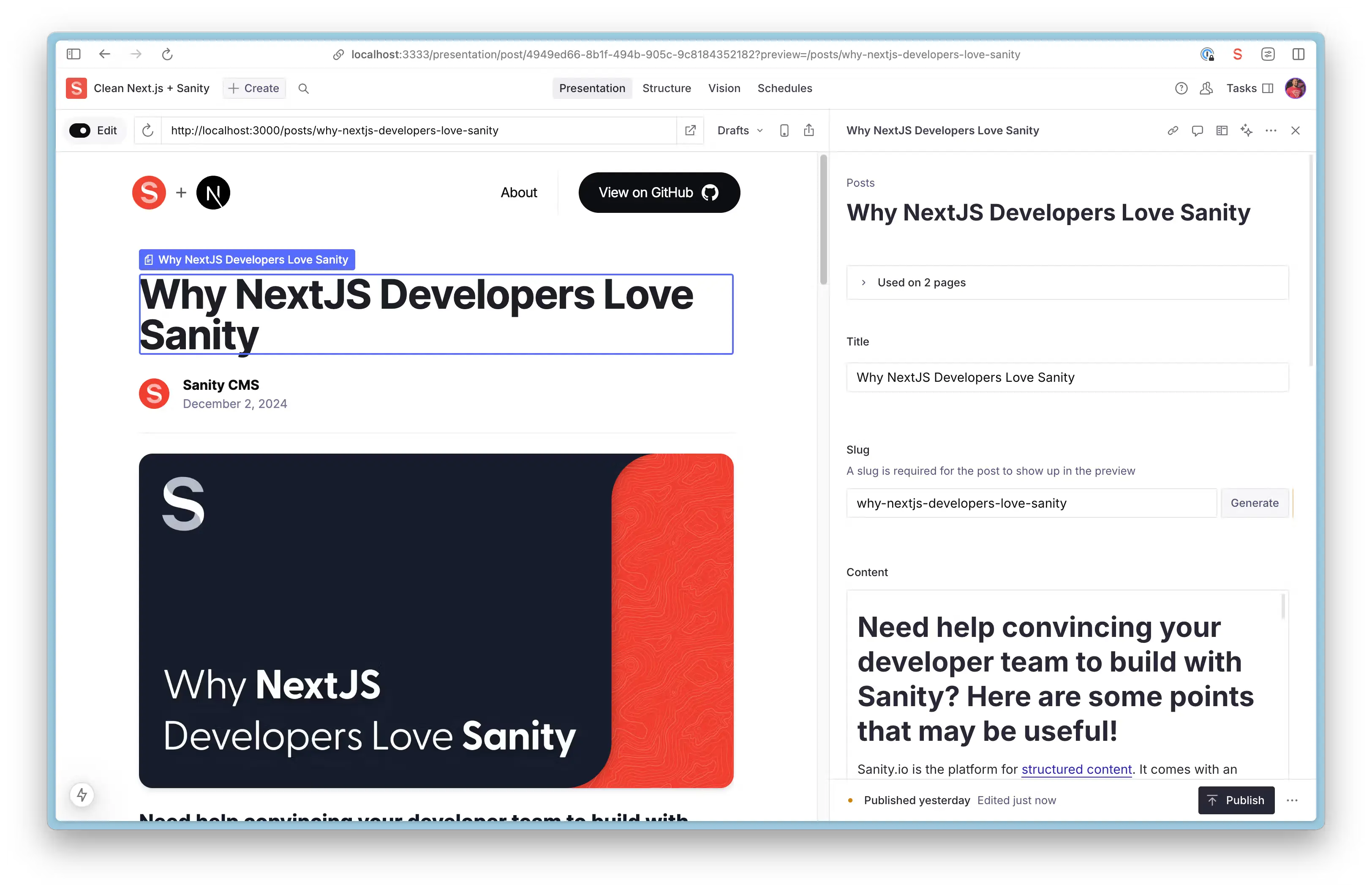
  • Real-time Visual Editing: Edit content live with Sanity's Presentation Tool and see updates in real time.
  • Live Content: The Live Content API allows you to deliver live, dynamic experiences to your users without the complexity and scalability challenges that typically come with building real-time functionality.
  • Customizable Pages with Drag-and-Drop: Create and manage pages using a page builder with dynamic components and Drag-and-Drop Visual Editing.
  • Powerful Content Management: Collaborate with team members in real-time, with fine-grained revision history.
  • AI-powered Media Support: Auto-generate alt text with Sanity AI Assist.
  • On-demand Publishing: No waiting for rebuilds—new content is live instantly with Incremental Static Revalidation.
  • Easy Media Management: Integrated Unsplash support for seamless media handling.

Demo

https://template-nextjs-clean.sanity.dev

Getting Started

Installing the template

Already deployed with Vercel? If you've already deployed using the Sanity + Vercel Integration or one-click Vercel button, please visit our Vercel deployment instructions to set up your local environment and deploy Sanity Studio.

1. Initialize template with Sanity CLI

Run the command in your Terminal to initialize this template on your local computer.

npm create sanity@latest -- --template sanity-io/sanity-template-nextjs-clean

See the documentation if you are having issues with the CLI.

2. Run Studio and Next.js app locally

Navigate to the template directory using cd <your app name>, and start the development servers by running the following command

npm run dev
3. Open the app and sign in to the Studio

Open the Next.js app running locally in your browser on http://localhost:3000.

Open the Studio running locally in your browser on http://localhost:3333. You should now see a screen prompting you to log in to the Studio. Use the same service (Google, GitHub, or email) that you used when you logged in to the CLI.

Adding content with Sanity

1. Publish your first document

The template comes pre-defined with a schema containing Page, Post, Person, and Settings document types.

From the Studio, click "+ Create" and select the Post document type. Go ahead and create and publish the document.

Your content should now appear in your Next.js app (http://localhost:3000) as well as in the Studio on the "Presentation" Tab

2. Import Sample Data (optional)

You may want to start with some sample content and we've got you covered. Run this command from the root of your project to import the provided dataset (sample-data.tar.gz) into your Sanity project. This step is optional but can be helpful for getting started quickly.

npm run import-sample-data
3. Extending the Sanity schema

The schema for the Post document type is defined in the studio/src/schemaTypes/post.ts file. You can add more document types to the schema to suit your needs.

Deploying your application and inviting editors

1. Deploy Sanity Studio

Your Next.js frontend (/frontend) and Sanity Studio (/studio) are still only running on your local computer. It's time to deploy and get it into the hands of other content editors.

Back in your Studio directory (/studio), run the following command to deploy your Sanity Studio.

npx sanity deploy
2. Deploy Next.js app to Vercel

You have the freedom to deploy your Next.js app to your hosting provider of choice. With Vercel and GitHub being a popular choice, we'll cover the basics of that approach.

  1. Create a GitHub repository from this project. Learn more.
  2. Create a new Vercel project and connect it to your Github repository.
  3. Set the Root Directory to your Next.js app.
  4. Configure your Environment Variables.
3. Invite a collaborator

Now that you’ve deployed your Next.js application and Sanity Studio, you can optionally invite a collaborator to your Studio. Open up Manage, select your project and click "Invite project members"

They will be able to access the deployed Studio, where you can collaborate together on creating content.

Resources

  • Sanity documentation
  • Next.js documentation
  • Join the Sanity Community
  • Learn Sanity
GitHub Reposanity-io/sanity-template-nextjs-clean
Use Cases
BlogCMS
Stack
Next.jsTailwind
CMS
Sanity

Related Templates

Get Started

  • Templates
  • Supported frameworks
  • Marketplace
  • Domains

Build

  • Next.js on Vercel
  • Turborepo
  • v0

Scale

  • Content delivery network
  • Fluid compute
  • CI/CD
  • Observability
  • AI GatewayNew
  • Vercel AgentNew

Secure

  • Platform security
  • Web Application Firewall
  • Bot management
  • BotID
  • SandboxNew

Resources

  • Pricing
  • Customers
  • Enterprise
  • Articles
  • Startups
  • Solution partners

Learn

  • Docs
  • Blog
  • Changelog
  • Knowledge Base
  • Academy
  • Community

Frameworks

  • Next.js
  • Nuxt
  • Svelte
  • Nitro
  • Turbo

SDKs

  • AI SDK
  • Workflow SDKNew
  • Flags SDK
  • Chat SDK
  • Streamdown AINew

Use Cases

  • Composable commerce
  • Multi-tenant platforms
  • Web apps
  • Marketing sites
  • Platform engineers
  • Design engineers

Company

  • About
  • Careers
  • Help
  • Press
  • Legal
  • Privacy Policy

Community

  • Open source program
  • Events
  • Shipped on Vercel
  • GitHub
  • LinkedIn
  • X
  • YouTube

Loading status…

Select a display theme:
    • AI Cloud
      • v0

        Build applications with AI

      • AI SDK

        The AI Toolkit for TypeScript

      • AI Gateway

        One endpoint, all your models

      • Vercel Agent

        An agent that knows your stack

      • Sandbox

        AI workflows in live environments

    • Core Platform
      • CI/CD

        Helping teams ship 6× faster

      • Content Delivery

        Fast, scalable, and reliable

      • Fluid Compute

        Servers, in serverless form

      • Observability

        Trace every step

    • Security
      • Bot Management

        Scalable bot protection

      • BotID

        Invisible CAPTCHA

      • Platform Security

        DDoS Protection, Firewall

      • Web Application Firewall

        Granular, custom protection

    • Company
      • Customers

        Trusted by the best teams

      • Blog

        The latest posts and changes

      • Changelog

        See what shipped

      • Press

        Read the latest news

      • Events

        Join us at an event

    • Learn
      • Docs

        Vercel documentation

      • Academy

        Linear courses to level up

      • Knowledge Base

        Find help quickly

      • Community

        Join the conversation

    • Open Source
      • Next.js

        The native Next.js platform

      • Nuxt

        The progressive web framework

      • Svelte

        The web’s efficient UI framework

      • Turborepo

        Speed with Enterprise scale

    • Use Cases
      • AI Apps

        Deploy at the speed of AI

      • Composable Commerce

        Power storefronts that convert

      • Marketing Sites

        Launch campaigns fast

      • Multi-tenant Platforms

        Scale apps with one codebase

      • Web Apps

        Ship features, not infrastructure

    • Tools
      • Marketplace

        Extend and automate workflows

      • Templates

        Jumpstart app development

      • Partner Finder

        Get help from solution partners

    • Users
      • Platform Engineers

        Automate away repetition

      • Design Engineers

        Deploy for every idea

  • Enterprise
  • Pricing
Log InContact
Sign Up
Sign Up
Back to Templates
DeployView Demo

Stablo – Minimal Blog Template

A minimal blog website template built with Next.js, TailwindCSS & Sanity CMS
Stablo – Minimal Blog Template
v0

Build applications with AI

AI SDK

The AI Toolkit for TypeScript

AI Gateway

One endpoint, all your models

Vercel Agent

An agent that knows your stack

Sandbox

AI workflows in live environments

CI/CD

Helping teams ship 6× faster

Content Delivery

Fast, scalable, and reliable

Fluid Compute

Servers, in serverless form

Observability

Trace every step

Bot Management

Scalable bot protection

BotID

Invisible CAPTCHA

Platform Security

DDoS Protection, Firewall

Web Application Firewall

Granular, custom protection

Customers

Trusted by the best teams

Blog

The latest posts and changes

Changelog

See what shipped

Press

Read the latest news

Events

Join us at an event

Docs

Vercel documentation

Academy

Linear courses to level up

Knowledge Base

Find help quickly

Community

Join the conversation

Next.js

The native Next.js platform

Nuxt

The progressive web framework

Svelte

The web’s efficient UI framework

Turborepo

Speed with Enterprise scale

AI Apps

Deploy at the speed of AI

Composable Commerce

Power storefronts that convert

Marketing Sites

Launch campaigns fast

Multi-tenant Platforms

Scale apps with one codebase

Web Apps

Ship features, not infrastructure

Marketplace

Extend and automate workflows

Templates

Jumpstart app development

Partner Finder

Get help from solution partners

Platform Engineers

Automate away repetition

Design Engineers

Deploy for every idea